22 July 2026 · 12 min read · Updated 5 September 2026
Free Household Budget Template: Google Sheets vs a Shared Budgeting App
A household budget template is one of the simplest ways to start understanding where your money goes.
The short version
- A workable template has five parts: a monthly overview, categories with caps, a daily expense log, a recurring-expenses tab and a place for irregular costs.
- Google Sheets is excellent for planning a family budget and free forever; its limits are daily entry on a phone and splitting mixed purchases.
- The spreadsheet is rarely what fails — the daily typing is. Move to an app at the point where keeping the log current is the thing that breaks.
- The best template is the one your household will actually maintain, not the one with the most tabs.
You do not need a complex finance system to begin. A clear spreadsheet can help you list expenses, group them into categories, set monthly caps, and see whether the household is staying within the plan.
But a template has one major weakness: someone has to keep it updated.
That is where many household budgets fail. The plan is created once, then daily purchases are forgotten, entered late, or handled by one person who becomes solely responsible for tracking everything.
This guide gives you a practical household budget template structure, explains how to use it in Google Sheets, and compares when a spreadsheet is enough — and when a shared budgeting app may work better.
What is a household budget template?
A household budget template is a reusable structure for planning and tracking shared monthly expenses. It usually includes your available spending amount, fixed and variable expenses, budget categories, planned caps, actual spending, and the difference between the two.
For a shared household budget, the most important part is not the spreadsheet itself — it is the agreement behind it. Everyone in the household should understand which expenses belong in the shared budget and which remain personal. You also need to agree on who records each purchase, how often the budget is reviewed, and what happens when a category nears its cap. A template gives the household a structure, but the routine keeps it useful.
Free household budget template structure
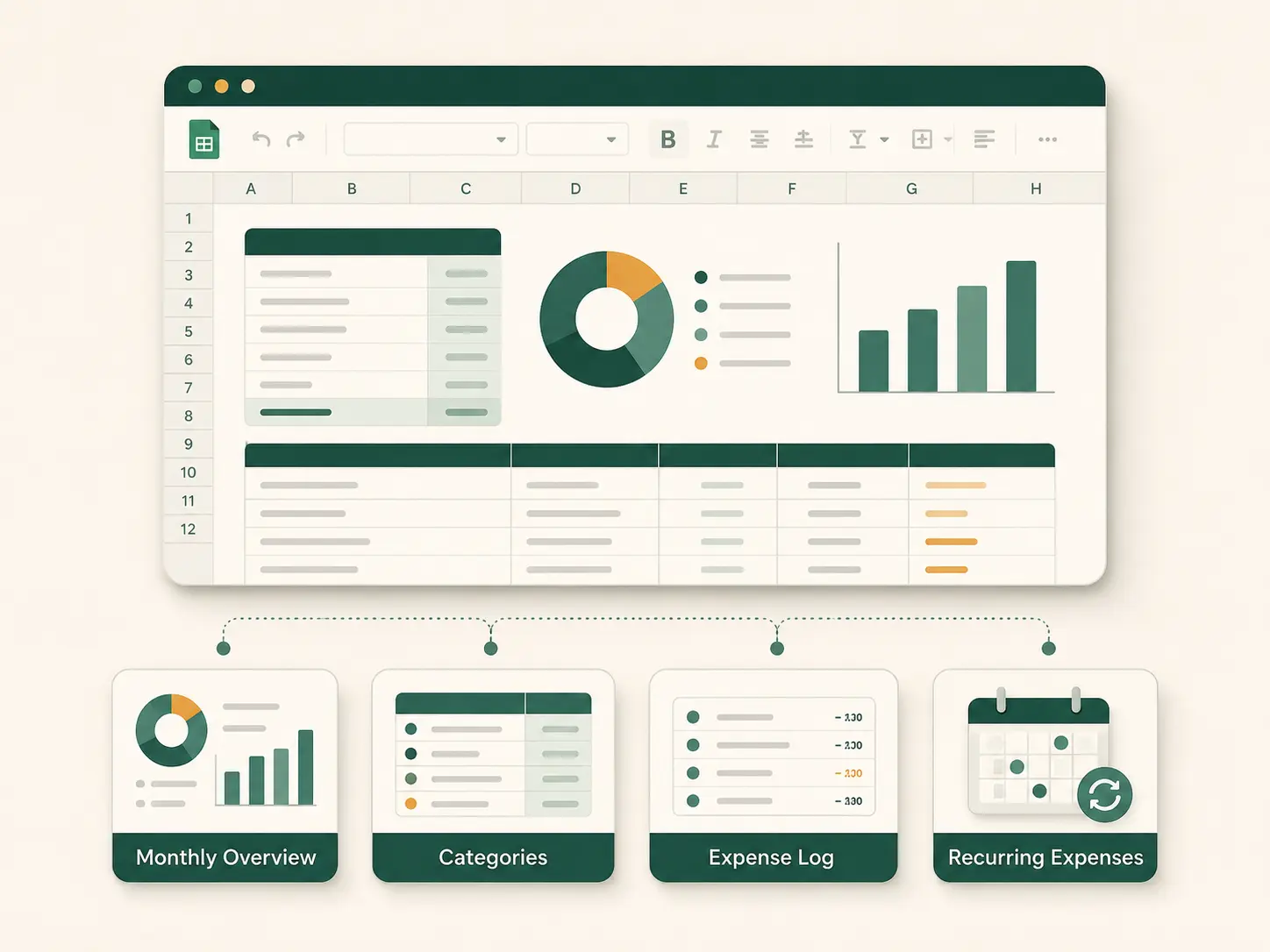
You can build this template in Google Sheets, Excel, or any spreadsheet tool. We recommend using four distinct tabs: Monthly Overview, Categories, Expense Log, and Recurring Expenses. This structure is simple enough to maintain but detailed enough to show exactly where your money is going.
Tab 1: Monthly Overview
The Monthly Overview tab shows your high-level budget position.
| Field | Example |
|---|---|
| Month | June |
| Monthly household spending cap | $4,000 |
| Planned category total | $3,850 |
| To Be Allocated / buffer | $150 |
| Actual spending so far | $2,740 |
| Remaining budget | $1,260 |
This tab answers the main question: how much of the household budget is still available?
The “To Be Allocated” amount is the difference between your overall spending cap and your individual category caps. It should be used as a deliberate buffer for irregular costs. This mirrors CapKin’s approach: the household sets one overall cap, assigns category limits, and keeps any unallocated amount visible instead of pretending every dollar has already been assigned. By deliberately functioning as a shared spend tracker rather than a complex banking or wealth management tool, CapKin keeps this overview incredibly clear.
Tab 2: Categories
The Categories tab lists the household’s planned spending areas.
| Category | Monthly cap | Actual spending | Remaining | Status |
|---|---|---|---|---|
| Housing | $1,500 | $1,500 | $0 | Reached cap |
| Utilities | $300 | $240 | $60 | On track |
| Groceries | $650 | $480 | $170 | On track |
| Transport | $250 | $210 | $40 | Close |
| Children | $300 | $180 | $120 | On track |
| Health | $100 | $45 | $55 | On track |
| Household | $150 | $130 | $20 | Close |
| Dining out | $200 | $190 | $10 | Close |
| Entertainment | $100 | $60 | $40 | On track |
| Subscriptions | $100 | $95 | $5 | Close |
| Gifts | $100 | $20 | $80 | On track |
| Other | $100 | $40 | $60 | On track |
A good household budget usually starts with eight to twelve main categories. Avoid creating too many categories at the beginning; a category should exist only when it helps the household make a decision. For example, “Groceries” is usually much more useful than separate categories for bread, fruit, vegetables, dairy, and snacks.
Tab 3: Expense Log
The Expense Log tab is where individual purchases are recorded.
| Date | Person | Description | Category | Amount | Payment method | Notes |
|---|---|---|---|---|---|---|
| Jun 1 | Alex | Rent | Housing | $1,500 | Bank transfer | Fixed |
| Jun 2 | Sam | Supermarket | Groceries | $84.20 | Card | Weekly shop |
| Jun 2 | Jordan | Parking | Transport | $8.00 | Card | City centre |
| Jun 3 | Sam | School notebooks | Children | $16.50 | Cash | |
| Jun 4 | Alex | Pizza delivery | Dining out | $32.00 | Card |
This tab is the most important part of the spreadsheet because it feeds the category totals. The “Person” column is particularly critical, as a shared budget should never depend on one person remembering everyone else’s purchases.
Tab 4: Recurring Expenses
The Recurring Expenses tab lists predictable costs that appear every month or on a regular schedule.
| Expense | Category | Amount | Frequency | Due date | Auto-added? |
|---|---|---|---|---|---|
| Rent | Housing | $1,500 | Monthly | 1st | Yes |
| Internet | Utilities | $60 | Monthly | 5th | Yes |
| Mobile plans | Utilities | $80 | Monthly | 10th | Yes |
| Streaming service | Subscriptions | $15 | Monthly | 12th | Yes |
| Childcare | Children | $400 | Monthly | 15th | Yes |
| Car insurance | Insurance | $100 | Monthly equivalent | — | Yes |
Recurring expenses should be planned at the beginning of the month so the household does not overestimate how much is available for flexible spending. CapKin automates this step entirely by allowing you to set recurring templates for predictable costs like rent, utilities, and subscriptions. These are posted automatically into a new budget period while staying completely editable if the actual amount changes.
How to create the template in Google Sheets
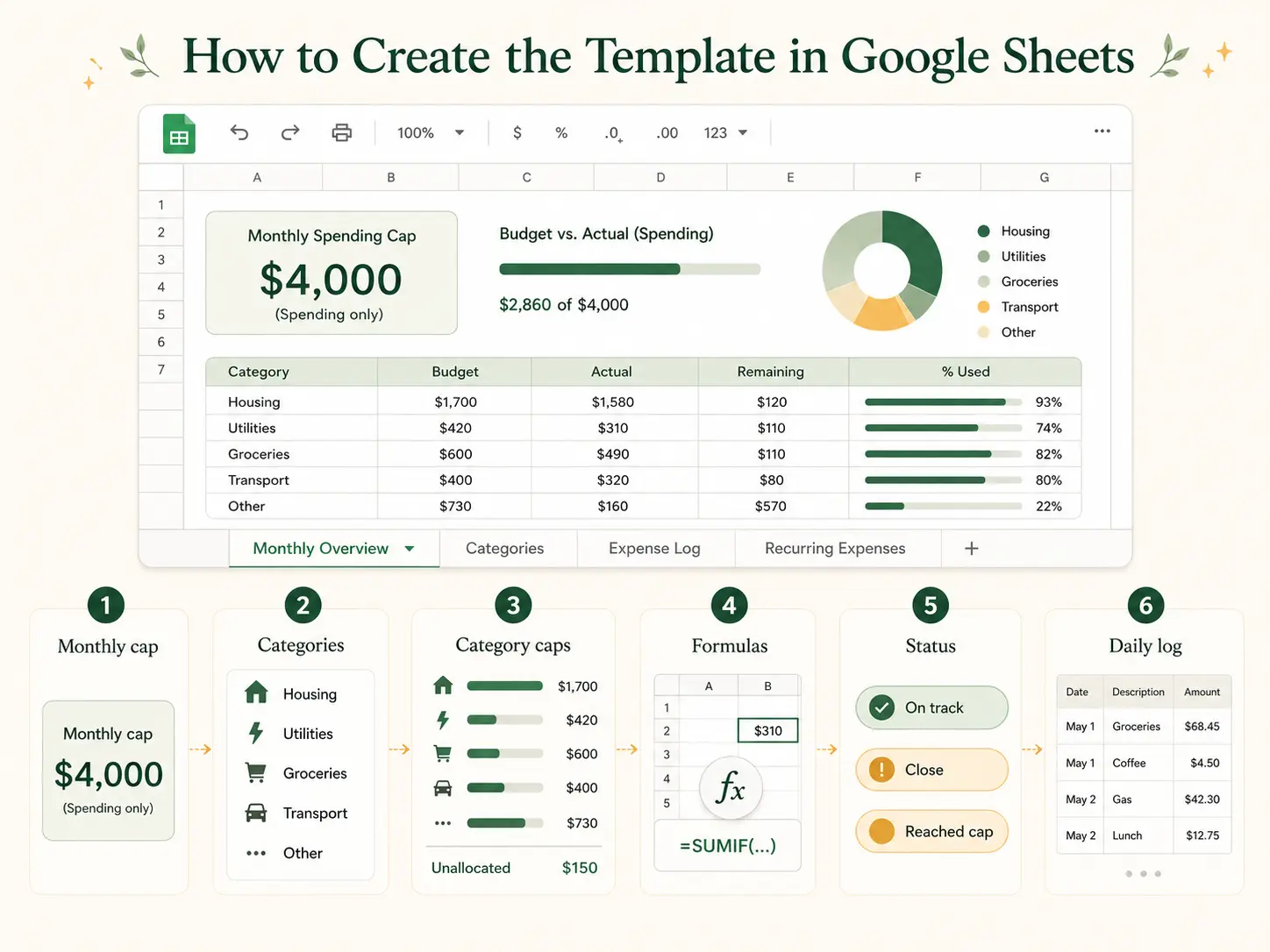
Create a new Google Sheet, add the four tabs mentioned above, and follow these steps:
Step 1: Set your household spending cap. Start with one number, such as $4,000. This is the amount the household plans to spend on the expenses included in the shared budget. It does not have to include income, savings, or investments; a household spending template can stay strictly focused on outflows.
Step 2: Choose your categories. Start with a simple list like Housing, Utilities, Groceries, Transport, Children, Health, Dining out, Subscriptions, and Gifts — there is a fuller list of family budget categories if you want one to copy from. Adjust the list based on how your household actually spends money. A couple may not need a children category, while a family with pets will likely need a dedicated pet care category.
Step 3: Set a cap for each category. Assign a planned amount to each category. Crucially, do not force the planned category total to equal the full monthly cap. Keeping a buffer helps cover irregular or forgotten expenses.
Step 4: Add formulas for actual spending. In the Categories tab, use formulas to calculate actual spending from the Expense Log. In Google Sheets, you can use a formula like =SUMIF('Expense Log'!D:D, A2, 'Expense Log'!E:E) (where Column D is the category, Column E is the amount, and A2 is the category name). Then, calculate your remaining budget by subtracting actual spending from the monthly cap.
Step 5: Add a status column. Use simple, factual labels like “On track” (more than 25% left), “Close” (1–25% left), and “Reached cap.” Keep the language calm and objective. The goal is to help the household see what needs attention, not create panic. CapKin follows this exact principle: threshold messages are clear and calm, using gentle nudges rather than alarmist warnings.
Step 6: Update the Expense Log daily. The spreadsheet only works if purchases are entered consistently. A useful rule is to record household purchases before the end of the day. This is where templates often become difficult; the structure may be perfect, but the daily habit still depends on people remembering to open a spreadsheet and type out the data.
Google Sheets household budget template: advantages
A spreadsheet is a strong starting point for many households for several reasons:
- It is highly flexible: You can create any category, formula, or view you need. This is particularly useful if your household has a specific structure, such as shared rent but separate groceries, irregular freelance income, or a custom debt repayment plan.
- It is familiar and free: Most people already understand how spreadsheets work, meaning there is no new app to learn and no onboarding process. Google Sheets is also available at no cost.
- It is completely transparent: Every formula is visible. If the household wants to check how totals are calculated, they can inspect the sheet directly.
- It works well for initial planning: Spreadsheets are fantastic for creating your first category list, estimating monthly costs, and reviewing annual expenses before committing to a system.
Google Sheets household budget template: limitations
The weakness of a spreadsheet usually appears after the budget is created and the daily reality sets in.
Daily expense entry becomes repetitive. Every single purchase requires manual entry of the date, person, description, category, and amount. This becomes frustrating when several people make multiple purchases each day. Furthermore, mobile entry is often inconvenient. Spreadsheets work beautifully on a laptop, but they are cumbersome when you’re leaving a shop holding bags, sitting in a car, or trying to log small purchases quickly on the go.
One person usually assumes the burden. Even if the sheet is shared, one person inevitably becomes the “budget enforcer,” asking what was spent, whether a purchase was personal or shared, or if anyone recorded the school supplies. The template is shared, but the work is not. This is exactly why many families abandon traditional budgeting tools — keeping them current becomes a second job for the organiser.
Inconsistencies and mixed purchases cause headaches. One person might type “Taxi” under Transport, while another writes “Uber” under Travel. These small inconsistencies break formulas and make monthly totals unreliable. Mixed purchases are even worse; a single supermarket receipt might include groceries, cleaning products, and a birthday gift. In a spreadsheet, you have to do the math and manually split the receipt across several rows.
Lack of permissions and proactive notifications. A spreadsheet cannot naturally manage household roles. You can’t easily set it so a child can add entries but not edit the budget, or require approval for certain expenses — which is what a pocket money tracker does by design. Additionally, while a spreadsheet can show a category is near its cap if you actively check it, it won’t proactively nudge the household at the right moment without complex custom automation. CapKin solves this by offering dedicated member roles and capture-only access for children, allowing the household to share expense capture securely.
Budgeting app vs household budget template
A spreadsheet and a budgeting app are not direct replacements for one another; they excel at different jobs. A template helps you design the budget. A shared budgeting app helps the household keep it updated.
| Feature / Need | Google Sheets template | Shared budgeting app |
|---|---|---|
| Initial budget planning | Strong | Strong |
| Full customisation | Strong | Limited by product design |
| Daily mobile entry | Weaker | Stronger |
| Shared household participation | Possible, but manual | Built for it |
| Voice or text capture | No native structured capture | Possible in voice-first apps |
| Category caps | Formula-based | Built into the workflow |
| Recurring expenses | Manual or formula-based | Can be automated |
| Children’s access | Difficult | Possible with roles |
| Notifications | Requires complex setup | Built into app logic |
| Historical analysis | Strong if maintained | Strong if product supports reports |
| Privacy without bank link | Yes | Yes, depending on the app |
When a Google Sheets budget template is enough
Use a spreadsheet when you have a simple expense structure, purchases are entered weekly rather than immediately, and one person is comfortable maintaining it. It is also ideal when you are testing a budget for the first time and want maximum flexibility to decide which categories belong in your household budget.
When a budgeting app may work better
A shared budgeting app is the better choice when several people need to record spending, and one person is tired of doing all the tracking. It is ideal when mobile entry needs to be fast, voice or free-text capture would make logging easier, and the household wants proactive notifications and live category caps without having to connect their bank accounts.
CapKin is designed specifically for this use case. It lets household members say or type what they bought, sorts the purchases into categories automatically, keeps each category visible against its cap, and nudges only when something needs attention.
Budget template vs CapKin-style tracking
CapKin should not be described as a full replacement for every spreadsheet. A spreadsheet can still be highly useful for forecasting or custom analysis. CapKin is simply more focused. It is built strictly for shared spend tracking: recording purchases, confirming categories, comparing spending with caps, and keeping everyone looking at the same current picture.
| Task | Spreadsheet | CapKin-style workflow |
|---|---|---|
| Plan monthly categories | Yes | Yes |
| Set category caps | Yes | Yes |
| Track household purchases | Yes, manually | Yes, by voice or text |
| Split several purchases from one sentence | No | Yes |
| Confirm before saving | Manual review | Built into the flow |
| Record purchases by several members | Possible | Built for shared use |
| Child capture-only access | Difficult | Planned role structure |
| Track bank balances | Only if manually entered | No |
| Move money | No | No |
| Manage investments | No | No |
CapKin deliberately focuses on one specific job. It does not try to manage all your money, grow your savings, or act as a complete wealth management dashboard.
How to move from a spreadsheet to a budgeting app
A spreadsheet is often the best place to start, as it helps the household understand its structure before committing to a tool.
- Step 1: Build your first category list in Google Sheets. Keep only the categories that the household will actually use.
- Step 2: Track one complete month. Record every household expense for one month — the monthly household expenses list is a useful check for the ones people forget. Do not worry if the template is imperfect; the purpose is to reveal your spending patterns.
- Step 3: Review what was difficult. Ask yourselves: Which expenses were forgotten? Did one person do most of the tracking? Were mixed purchases hard to split? These pain points indicate exactly where an app will help.
- Step 4: Keep the category structure. Move those same categories and caps directly into the budgeting app so you don’t have to start from zero.
- Step 5: Use the app for daily capture. Let the app handle the repetitive parts: logging purchases, proposing categories, updating totals, and nudging when a category needs attention.
- Step 6: Keep the spreadsheet for periodic review. Some households may still prefer a spreadsheet for annual or quarterly analysis. The app can serve the daily habit, while the spreadsheet serves broader reviews.
Example household budget templates
Here are a few ways to structure your categories based on your living situation.
For couples
A couple may use a simple shared budget that excludes personal spending, focusing only on shared obligations.
| Category | Monthly cap |
|---|---|
| Rent | $1,600 |
| Utilities | $300 |
| Groceries | $500 |
| Transport | $250 |
| Household supplies | $150 |
| Dining out | $200 |
| Subscriptions | $100 |
| Entertainment | $150 |
| Gifts | $100 |
| Buffer | $150 |
| Total | $3,500 |
For families with children
A family with children generally needs to separate predictable child-related costs from general groceries and household purchases.
| Category | Monthly cap |
|---|---|
| Housing | $1,700 |
| Utilities | $350 |
| Groceries | $750 |
| Transport | $350 |
| Childcare and school | $500 |
| Children’s activities | $200 |
| Health | $150 |
| Household supplies | $180 |
| Dining out | $180 |
| Subscriptions | $100 |
| Gifts and celebrations | $120 |
| Buffer | $220 |
| Total | $4,800 |
For shared flats
A shared flat budget should include only shared costs. Personal food, clothing, transport, and entertainment stay outside the shared household budget.
| Category | Monthly cap |
|---|---|
| Rent | $2,200 |
| Utilities | $400 |
| Internet | $80 |
| Shared groceries | $300 |
| Household supplies | $120 |
| Repairs and replacements | $100 |
| Shared subscriptions | $50 |
| Buffer | $150 |
| Total | $3,400 |
Common mistakes when using a household budget template
- Creating too many categories: A highly detailed budget can feel incredibly organised at first, but it quickly becomes hard to maintain. Start broad, and add detail only when it supports a specific financial decision.
- Forgetting irregular expenses: Annual renewals, school costs, car repairs, and gifts can make the budget feel constantly inaccurate. Always add a monthly allowance or a general buffer for irregular costs.
- Mixing shared and personal spending: Clearly agree on what belongs in the household budget. For couples and families, setting this boundary is often more important than the exact spreadsheet design.
- Updating the sheet only once a month: A monthly review is highly useful, but purchases should be recorded throughout the month. Otherwise, the household discovers overspending far too late to adjust their habits.
- Making one person responsible for every entry: A shared household budget should never depend on one person collecting everyone’s spending information. Give every household member a way to contribute their own purchases — the routine for that is in how to create a shared family budget.
- Treating the template as the solution: The template is merely the structure; the behaviour is the system. If the household does not record purchases consistently, the template will not stay accurate.
Start with a template. Use an app when tracking becomes the problem.
A free household budget template is a practical first step. It helps you list expenses, choose categories, set monthly caps, and truly understand the structure of your household spending.
But the template alone does not solve the daily tracking problem. If one person still has to collect receipts, ask everyone what they spent, split mixed purchases, and update the sheet manually, the budget quickly becomes another exhausting chore.
That is the exact point where a shared budgeting app becomes useful. CapKin is built for households that want one shared spending picture without bank linking or complicated forms. Members say or type what they bought, review the proposed categories, and keep each category visible against its cap.
Start with the template. Keep the household picture current with CapKin.
Frequently asked questions
- What is the best household budget template?
- The best household budget template is one the household can actually maintain. It should include a monthly overview, budget categories, an expense log, a recurring expenses tab, and a dedicated place for irregular costs or buffers.
- Can I use Google Sheets for a family budget?
- Yes. Google Sheets works exceptionally well for planning a family budget, setting categories, and tracking spending. Its main limitation is that daily mobile expense entry can become highly repetitive, and mixed purchases are tedious to split.
- What should a household budget spreadsheet include?
- It should include monthly caps, budget categories, actual spending totals, remaining amounts, a list of recurring expenses, and a detailed daily expense log.
- Is a budgeting app better than a spreadsheet?
- A budgeting app is usually better for daily tracking, shared household participation, and fast mobile entry. A spreadsheet is usually better for custom planning, initial category creation, and deep analysis.
- Should I use a budget template before choosing an app?
- Yes. A template can help your household understand your specific categories, caps, and recurring expenses before you commit to moving those details into an app.
- How many categories should my household budget have?
- Most households can start comfortably with eight to twelve main categories. Too many categories can make daily tracking significantly harder.
- Can I budget without connecting my bank account?
- Absolutely. You can use a spreadsheet, a manual expense tracker, or a voice and text-based budgeting app without ever linking your bank accounts.