3 July 2026 · 10 min read · Updated 5 September 2026
How to Track Expenses Without Linking Your Bank Account
Many budgeting apps ask you to connect a bank account before you have created a budget, added a category, or recorded a single expense.
The short version
- Tracking without bank sync means every expense exists because a person entered it — by voice, by typing, or from a receipt.
- The trade is real: you give up automatic import and get a budget that contains only what your household actually noticed.
- The failure mode is the chore of daily entry, so the method has to take seconds on a phone or it will not last a month.
- What it cannot do on its own: catch a payment nobody logged, reconcile a balance, or split a mixed purchase without you.
The connection can make expense tracking more automatic. Transactions appear inside the app, and you do not have to enter every purchase yourself. But bank sync is not the only way to understand where your money goes.
You can track expenses without linking a bank account by recording purchases manually, importing statements, using a spreadsheet, or choosing an expense tracker built around voice and text entry. The right method depends on how much automation, control, and detail you need.
This guide explains how a no-bank-link budgeting app works, where it is useful, and how to make it simple enough to maintain.
What does tracking expenses without bank linking mean?
Tracking expenses without bank linking means that a budgeting or expense-tracking tool does not automatically retrieve transactions from your bank or card accounts. Instead, you provide the spending information yourself.
That can involve typing an expense into an app, speaking a purchase into your phone, recording purchases in a spreadsheet, or periodically reviewing statements and entering totals.
The tool may still calculate category totals, compare spending with your budget, and produce reports. The difference is simply how the transaction data enters the system. With bank sync, the app retrieves it. Without bank sync, you decide exactly what to record and when to record it.
Why do budgeting apps ask you to connect a bank account?
Bank connections solve a real problem: manual expense tracking can be repetitive. When an account is connected, the app can import transactions automatically, detect recurring payments, suggest categories, and combine activity from several accounts. For someone who wants a complete financial dashboard with balances, income, investments, debts, and spending in one place, bank connectivity is incredibly useful.
But not every household needs a complete financial dashboard. Some people only want to answer a smaller set of questions: How much has the household spent this month? Are groceries or dining costs approaching their caps? Has everyone recorded their shared purchases?
A manual expense tracker can answer those questions without becoming the central hub for every part of your finances. CapKin is designed around that narrower purpose. It tracks household outflows against an overall spending cap and category caps, but it does not connect to bank accounts, import balances, or present itself as a complete wealth-management tool.
Bank-connected versus no-bank-link expense tracking
Neither method is automatically better; they simply solve different problems.
| Feature | Bank-connected tracking | Tracking without bank sync |
|---|---|---|
| Transaction capture | Usually automatic | Entered by the household |
| Setup | Requires account connection | Can begin with a budget and categories |
| Coverage | Can capture most account transactions | Includes only what you record |
| Control over imported data | Depends on connection and settings | You choose what enters the tracker |
| Cash purchases | Often require manual entry | Can be recorded like any other purchase |
| Shared household participation | May depend on account ownership | Each member can record their own spending |
| Best suited to | Full financial aggregation | Focused spending and category tracking |
The main trade-off is straightforward: automatic tracking reduces data entry, while no-bank-link tracking gives you more control over the scope of the system. The challenge is making manual capture fast enough that people actually continue doing it.
Why track expenses without linking a bank account?
There are several practical reasons to choose a private budgeting app or manual method.
1. You only need spending information
You may already manage income, savings, and account balances elsewhere. In that case, connecting every financial account to another app provides more information than you need. A focused expense tracker simply shows your spending cap, current spending, the amount remaining, and recent purchases. This is often all you need to make everyday spending decisions.
2. You want to choose what is recorded
A bank feed imports everything charged to the connected account, including purchases that may not belong in the shared household budget. For example, a single credit card might contain shared groceries alongside a reimbursable work purchase, a personal gift, or a transfer between accounts. A manual expense tracker lets you record only the expenses relevant to the budget you are maintaining.
3. Your household uses several payment methods
Household purchases are often spread across different bank accounts, credit cards, cash, digital wallets, and accounts belonging to different family members. Connecting one account won’t produce a complete shared picture. A shared expense tracker allows each person to record the purchases they make, regardless of the payment method.
4. You do not want another financial account connection
Some people are comfortable connecting financial accounts to third-party services, while others prefer not to — the trade-offs are set out in full in is it safe to link your bank account to a budgeting app. A no-bank-link approach removes the account connection from the process entirely. Before choosing any app, however, it’s still important to review what data it collects (such as categories, spending caps, and voice transcripts) and how long it is retained.
5. You want the household to participate
Automatic bank imports show what was paid, but they do not solve the organisational problem inside a household. One person usually still has to identify unfamiliar transactions, correct categories, separate shared and personal expenses, and ask who made a particular purchase.
A genuinely shared process gives each person responsibility for recording and confirming their own spending — for two adults that is the whole point of a budget both people can write to, and for children it is their own pocket money ledger with entries a parent approves. CapKin is structured around a shared household budget rather than one person’s account feed. The owner manages the budget and categories, while partners and teenagers can easily add their own purchases.
The main disadvantage: manual tracking can become a chore
The weakness of an expense tracker without bank sync is not the calculation — it is the capture process.
A traditional manual entry requires opening an app, selecting an expense form, typing the amount, adding a description, choosing a category, picking a date, and saving. That is manageable once, but it becomes tedious when several household members make multiple purchases every day.
A no-bank-link system only succeeds when recording an expense takes seconds, eliminating the friction of time, decision-making, and memory.
Ways to track expenses without connecting your bank
There are several methods, ranging from a notebook to a dedicated shared expense app.
1. Use a spreadsheet
A spreadsheet provides complete control over the structure, allowing you to track dates, amounts, categories, and payment methods with custom formulas — there is a ready household budget template for Google Sheets if you want the structure without building it. It is highly flexible and free, but mobile entry can be highly inconvenient, and it often becomes difficult to maintain if multiple people are trying to enter data consistently.
2. Use a notes app
A shared note can work as a fast, temporary spending log (e.g., “Groceries — $42.60”). It’s a familiar interface and great for traveling, but it lacks automatic category totals and doesn’t compare your spending against your caps, meaning you still have to organise the math later.
3. Use the envelope method
The envelope method assigns a set amount to each category. Every purchase reduces the remaining amount in that “envelope.” It is incredibly easy to understand and makes overspending instantly visible. However, purchases still need to be recorded manually, and physical cash envelopes rarely suit modern digital payments.
4. Import bank statements manually
Some tools allow users to upload CSV or OFX transaction files exported from online banking. This reduces individual data entry and provides broad transaction coverage. However, imported descriptions are often unclear, categories still require manual review, and it doesn’t provide a real-time picture of your household budget before the month ends.
5. Use a voice or text expense tracker
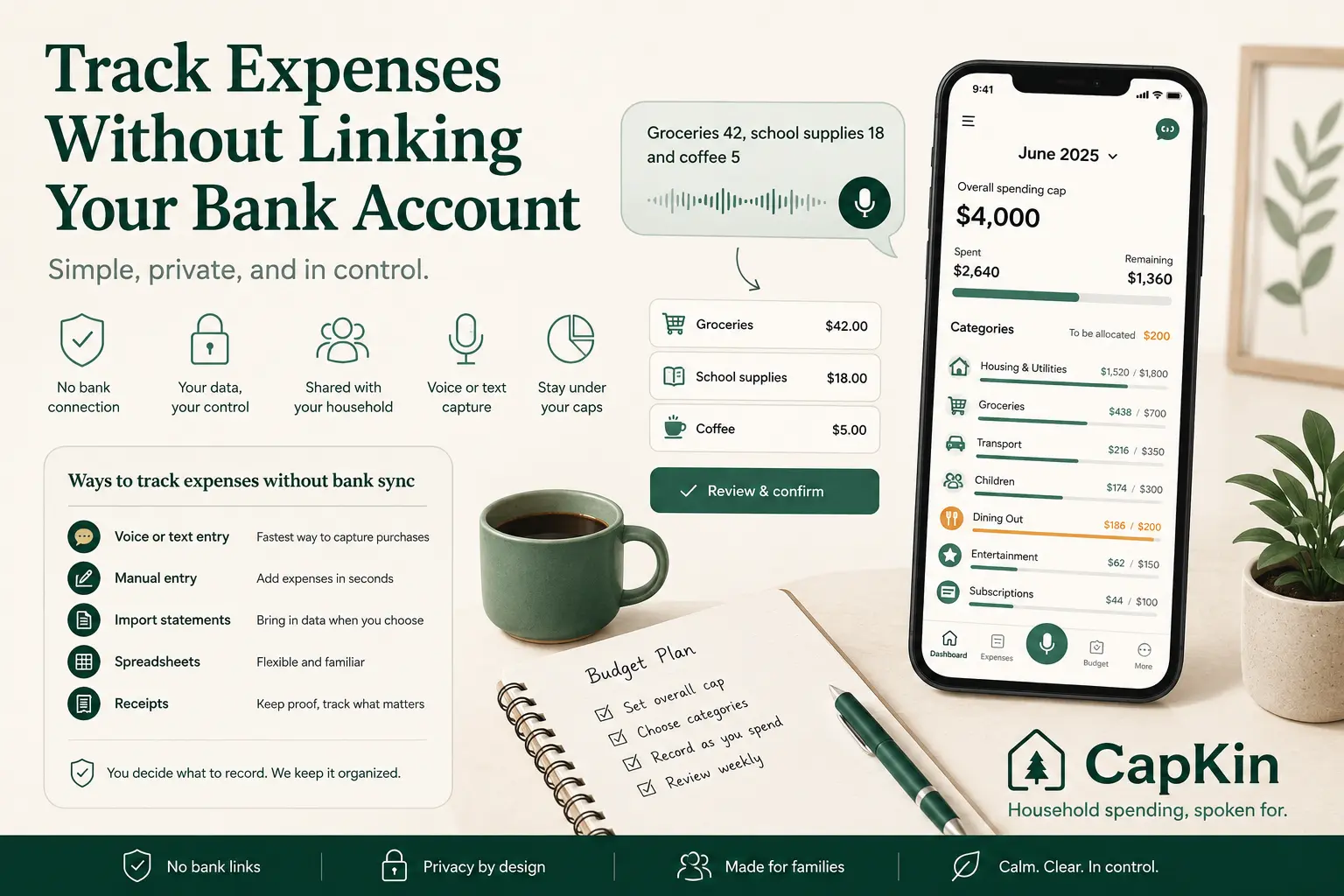
Voice-based tracking drastically reduces the amount of form-filling required. Instead of opening several fields, a household member can simply say, “Groceries 42, school supplies 18 and coffee 5.”
An AI-assisted tracker can separate the sentence into individual entries, suggest categories, and present the result for confirmation. CapKin uses this voice-first approach. Anything uncertain is flagged rather than silently saved, keeping the person in control of the budget before anything is written down.
How to set up a no-bank-link expense-tracking system
The tool matters, but the routine matters more. Use these steps to create a system your household can actually maintain.
Step 1: Define what you are tracking
Decide whether the tracker covers all household expenses, shared expenses only, or just variable expenses. A narrower scope is often easier to maintain. Write down the rule so everyone knows what belongs in the shared budget.
Step 2: Set an overall spending cap
Choose the maximum amount the household plans to spend during the month on the tracked expenses. CapKin follows this focused structure: the household sets an overall spending cap and tracks outflows against it, rather than attempting to reproduce every part of its financial life.
Step 3: Create a short category list
Start with eight to twelve categories that support real decisions, such as Housing, Groceries, Transport, Children, Dining Out, and Subscriptions — there is a full list of family budget categories if you would rather start from one. Avoid creating a separate category for every tiny type of purchase.
Step 4: Set a cap for each category
Assign part of the overall spending cap to each category. You do not need to assign the full amount immediately; keeping an unallocated buffer can easily cover irregular expenses during the month.
Step 5: Record purchases when they happen
Do not rely on remembering every purchase at the end of the week. The most sustainable moments to log an expense are immediately after paying, when leaving the shop, or when several small purchases can be captured in one quick sentence.
Step 6: Confirm the amount and category
AI categorisation reduces work, but it should never make final decisions without your review. In CapKin, parsing and saving are separate steps. The initial parse does not write an expense; your confirmation is the only path that saves it. For peace of mind, CapKin also deletes raw audio immediately after transcription, ensuring your household’s data stays private.
Step 7: Automate predictable expenses
No-bank-link tracking does not mean every entry must be recreated each month. Add recurring entries for predictable expenses like rent, internet, and insurance. This removes unnecessary repetition while preserving the privacy of the no-bank-connection model.
Step 8: Review the budget once a week
A short, ten-minute weekly review prevents missing purchases from accumulating. Check whether everyone has recorded their recent spending, if any category is approaching its cap, and if any unusual expenses are expected next week.
What to look for in an expense tracker without bank sync
When evaluating a budget app without bank connection, look for a complete, frictionless process. Fast expense capture is critical — if it takes too long to record a purchase, the budget will remain incomplete. Look for tools that offer both voice and text entry, as typing must remain available for noisy or public environments.
Ensure the app requires confirmation before saving, allows for custom categories, and uses category caps to make totals meaningful. Finally, a truly shared app should offer household access so every participating member can contribute without sharing a single login, alongside clear data-handling policies regarding how your entries and audio are processed and deleted.
What a no-bank-link expense tracker cannot do automatically
A focused spending tracker has limitations. Without access to your bank accounts, it cannot automatically know your current account balance, whether a payment has cleared, your salary deposits, or your complete net worth.
These limitations are entirely acceptable when the product is used for its intended purpose: tracking recorded spending against household caps. They only become a problem when a no-bank-link expense tracker pretends to be a complete financial-management system. CapKin is designed specifically as a shared spend tracker, rather than trying to be a bank or wealth management app.
Connecting a bank account can make transaction import easier, but it is never required for a useful household budget — CapKin runs entirely without a bank login, and what it does with the data it does hold is on the security page.
No bank connection. No money movement. Just household spending, spoken for.